Inside this article we will see the concept i.e Convert CSV File Data To JSON String Using PHP Tutorial. Article contains the classified information about Converting a CSV spreadsheet data to JSON data Using PHP.
If you are looking to find a solution i.e Convert a CSV file into JSON using PHP then you are at the right place to learn and implement.
Read More: How To Drop Column From Migration in Laravel Tutorial
Let’s get started.
Application Programming
Create a folder with name php-csv-json.
Next, create a file index.php inside it.
Open index.php and write this complete code into it.
<?php

    header('Content-type: application/json');

    //Set your file path here
    $filePath = 'https://docs.google.com/spreadsheets/d/e/2PACX-1vSsiduP6jDNLxxxx_bnruDzYIkYyyyy-s3WpPtEGJn8O3a_3D0ajfZiV0f4dkkattBHzzzzcSqPY/pub?gid=0&single=true&output=csv';

    // define two arrays for storing values
    $keys = array();
    $newArray = array();

    //PHP Function to convert CSV into an array
    function convertCsvToArray($file, $delimiter) {
        if (($handle = fopen($file, 'r')) !== FALSE) {
            $i = 0;
            while (($lineArray = fgetcsv($handle, 4000, $delimiter, '"')) !== FALSE) {
                for ($j = 0; $j < count($lineArray); $j++) {
                    $arr[$i][$j] = $lineArray[$j];
                }
                $i++;
            }
            fclose($handle);
        }
        return $arr;
    }
    // Call the function convert CSV To Array
    $data = convertCsvToArray($filePath, ',');

    // Set the number of elements (minus 1 because we shift off the first row)
    $count = count($data) - 1;

    //First row for label or name
    $labels = array_shift($data);
    foreach ($labels as $label) {
        $keys[] = $label;
    }

    // assign keys value to ids, we add new parameter id here
    $keys[] = 'id';
    for ($i = 0; $i < $count; $i++) {
        $data[$i][] = $i;
    }

    // combine both arrays
    for ($j = 0; $j < $count; $j++) {
        $d = array_combine($keys, $data[$j]);
        $newArray[$j] = $d;
    }

    // convert array to JSON PHP using the json_encode()
    $arrayToJson = json_encode($newArray);

    // print converted CSV value to JSON
    echo $arrayToJson;
?>
You have your code ready.
Now, you need a CSV spreadsheet data.
Read More: Laravel Migration with Default Current Timestamp Tutorial
Preparing CSV SpreadSheet Data
Open google sheet from your google account and create a live link with csv data or you can create a file in your system and download into .csv format.
For this demo, we have created CSV data in this way:
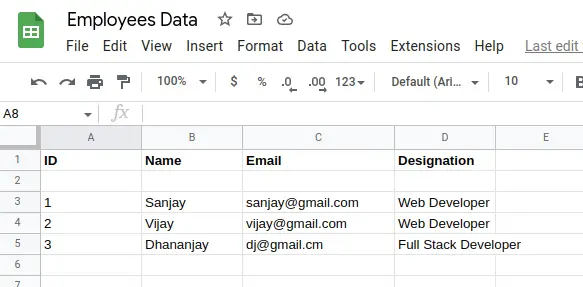
Generated Google sheet link,
https://docs.google.com/spreadsheets/d/e/2PACX-1vSsiduP6jDNLxxxx_bnruDzYIkYyyyy-s3WpPtEGJn8O3a_3D0ajfZiV0f4dkkattBHzzzzcSqPY/pub?gid=0&single=true&output=csvApplication Testing
Open your browser.
Next,
Your project URL will be like this.
URL: http://localhost/php-csv-json/index.php
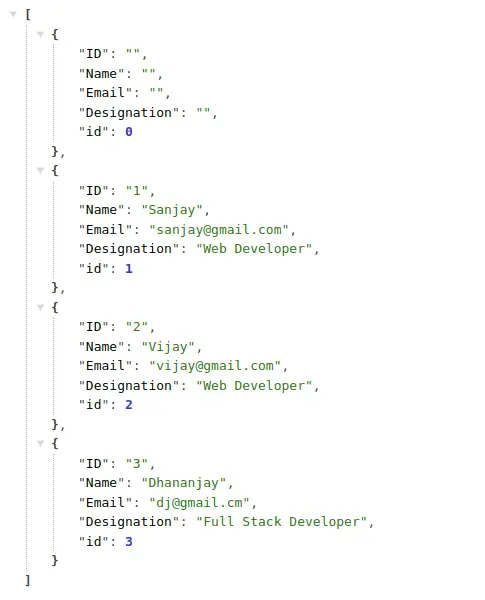
You can see, successfully CSV data converted into JSON data format.
Read More: Find NameServers of Domain Using PHP Shell Command
We hope this article helped you to learn about Convert CSV File Data To JSON String Using PHP Tutorial in a very detailed way.
If you liked this article, then please subscribe to our YouTube Channel for PHP & it’s framework, WordPress, Node Js video tutorials. You can also find us on Twitter and Facebook.