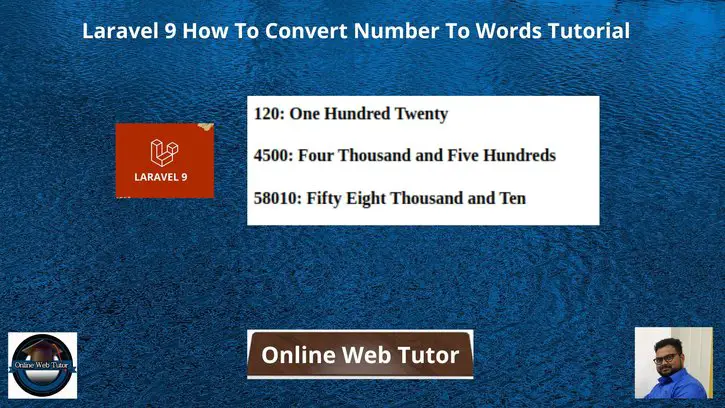
Inside this article we will see the concept i.e Laravel 9 How To Convert Number To Words Tutorial. Article contains the classified information about Conversion of Numbers to Words using concept of laravel.
If you are looking for a solution i.e How to Convert number to words using Laravel 9 then this article will help you a lot for this. Tutorial is super easy to understand and implement it in your code as well.
Number To Words means:
120: One Hundred Twenty

4500: Four Thousand and Five Hundreds
Learn More –
- How To Convert Number To Words in PHP
- How To Get The Last Character of a String in JavaScript
- Javascript Filter Array Elements with Multiple Conditions
- Javascript startsWith endsWith Methods Example Tutorial
Let’s get started.
Laravel Installation
Open terminal and run this command to create a laravel project.
composer create-project laravel/laravel myblogIt will create a project folder with name myblog inside your local system.
To start the development server of laravel –
php artisan serveURL: http://127.0.0.1:8000
Assuming laravel already installed inside your system.
Method #1: Number To Words within Controller
Let’s consider a application controller. In this controller we will create a method which handles number to words conversion.
Open project into terminal and create this controller:
$ php artisan make:controller DemoControllerIt will create a controller file DemoController.php inside /app/Http/Controllers folder.
Open DemoController.php file and write this code into it.
<?php

namespace App\Http\Controllers;

use Illuminate\Http\Request;

class DemoController extends Controller
{
    /**
     * Write code on Method
     *
     * @return response()
     */
    public function index()
    {
        $word = $this->numberToWord(120);
        print($word);

        echo "<br>";

        $word = $this->numberToWord(4500);
        print($word);

        echo "<br>";

        $word = $this->numberToWord(58010);
        print($word);
    }
    /**
     * Write code on Method
     *
     * @return response()
     */
    public function numberToWord($num = '')
    {
        $num    = (string) ((int) $num);

        if ((int) ($num) && ctype_digit($num)) {
            $words  = array();

            $num    = str_replace(array(',', ' '), '', trim($num));

            $list1  = array(
                '', 'one', 'two', 'three', 'four', 'five', 'six', 'seven',
                'eight', 'nine', 'ten', 'eleven', 'twelve', 'thirteen', 'fourteen',
                'fifteen', 'sixteen', 'seventeen', 'eighteen', 'nineteen'
            );

            $list2  = array(
                '', 'ten', 'twenty', 'thirty', 'forty', 'fifty', 'sixty',
                'seventy', 'eighty', 'ninety', 'hundred'
            );

            $list3  = array(
                '', 'thousand', 'million', 'billion', 'trillion',
                'quadrillion', 'quintillion', 'sextillion', 'septillion',
                'octillion', 'nonillion', 'decillion', 'undecillion',
                'duodecillion', 'tredecillion', 'quattuordecillion',
                'quindecillion', 'sexdecillion', 'septendecillion',
                'octodecillion', 'novemdecillion', 'vigintillion'
            );

            $num_length = strlen($num);
            $levels = (int) (($num_length + 2) / 3);
            $max_length = $levels * 3;
            $num    = substr('00' . $num, -$max_length);
            $num_levels = str_split($num, 3);

            foreach ($num_levels as $num_part) {
                $levels--;
                $hundreds   = (int) ($num_part / 100);
                $hundreds   = ($hundreds ? ' ' . $list1[$hundreds] . ' Hundred' . ($hundreds == 1 ? '' : 's') . ' ' : '');
                $tens       = (int) ($num_part % 100);
                $singles    = '';

                if ($tens < 20) {
                    $tens = ($tens ? ' ' . $list1[$tens] . ' ' : '');
                } else {
                    $tens = (int) ($tens / 10);
                    $tens = ' ' . $list2[$tens] . ' ';
                    $singles = (int) ($num_part % 10);
                    $singles = ' ' . $list1[$singles] . ' ';
                }
                $words[] = $hundreds . $tens . $singles . (($levels && (int) ($num_part)) ? ' ' . $list3[$levels] . ' ' : '');
            }
            $commas = count($words);
            if ($commas > 1) {
                $commas = $commas - 1;
            }

            $words  = implode(', ', $words);

            $words  = trim(str_replace(' ,', ',', ucwords($words)), ', ');
            if ($commas) {
                $words  = str_replace(',', ' and', $words);
            }

            return $words;
        } else if (!((int) $num)) {
            return 'Zero';
        }
        return '';
    }
}
Add Route
Open web.php file from /routes folder and add this route into it.
//...

use App\Http\Controllers\DemoController;

Route::get('number-to-words', [DemoController::class, "index"]);

//...
Once we will call the route, output will be:
One Hundred Twenty
Four Thousand and Five Hundreds
Fifty Eight Thousand and Ten
Method #2: Number To Words (Custom Blade Directive)
Here,
We will create a custom laravel directive i.e @numberToWord() via which we will register the concept of number to words conversion.
We need to register blade directive by using AppServiceProvider.
Open AppServiceProvider.php file from /app/Providers folder. Update this provide with this following updated code.
<?php

namespace App\Providers;

use Illuminate\Support\ServiceProvider;
use Illuminate\Support\Facades\Blade;

class AppServiceProvider extends ServiceProvider
{
    /**
     * Register any application services.
     *
     * @return void
     */
    public function register()
    {
    }

    /**
     * Bootstrap any application services.
     *
     * @return void
     */
    public function boot()
    {
        Blade::directive('numberToWord', function ($num) {

            $num  = (string) ((int) $num);

            if ((int) ($num) && ctype_digit($num)) {
                $words  = array();

                $num    = str_replace(array(',', ' '), '', trim($num));

                $list1  = array(
                    '', 'one', 'two', 'three', 'four', 'five', 'six', 'seven',
                    'eight', 'nine', 'ten', 'eleven', 'twelve', 'thirteen', 'fourteen',
                    'fifteen', 'sixteen', 'seventeen', 'eighteen', 'nineteen'
                );

                $list2  = array(
                    '', 'ten', 'twenty', 'thirty', 'forty', 'fifty', 'sixty',
                    'seventy', 'eighty', 'ninety', 'hundred'
                );

                $list3  = array(
                    '', 'thousand', 'million', 'billion', 'trillion',
                    'quadrillion', 'quintillion', 'sextillion', 'septillion',
                    'octillion', 'nonillion', 'decillion', 'undecillion',
                    'duodecillion', 'tredecillion', 'quattuordecillion',
                    'quindecillion', 'sexdecillion', 'septendecillion',
                    'octodecillion', 'novemdecillion', 'vigintillion'
                );

                $num_length = strlen($num);
                $levels = (int) (($num_length + 2) / 3);
                $max_length = $levels * 3;
                $num    = substr('00' . $num, -$max_length);
                $num_levels = str_split($num, 3);

                foreach ($num_levels as $num_part) {
                    $levels--;
                    $hundreds   = (int) ($num_part / 100);
                    $hundreds   = ($hundreds ? ' ' . $list1[$hundreds] . ' Hundred' . ($hundreds == 1 ? '' : 's') . ' ' : '');
                    $tens       = (int) ($num_part % 100);
                    $singles    = '';

                    if ($tens < 20) {
                        $tens = ($tens ? ' ' . $list1[$tens] . ' ' : '');
                    } else {
                        $tens = (int) ($tens / 10);
                        $tens = ' ' . $list2[$tens] . ' ';
                        $singles = (int) ($num_part % 10);
                        $singles = ' ' . $list1[$singles] . ' ';
                    }
                    $words[] = $hundreds . $tens . $singles . (($levels && (int) ($num_part)) ? ' ' . $list3[$levels] . ' ' : '');
                }
                $commas = count($words);
                if ($commas > 1) {
                    $commas = $commas - 1;
                }

                $words  = implode(', ', $words);

                $words  = trim(str_replace(' ,', ',', ucwords($words)), ', ');
                if ($commas) {
                    $words  = str_replace(',', ' and', $words);
                }
            } else if (!((int) $num)) {
                $words = 'Zero';
            } else {
                $words = '';
            }

            return $words;
        });
    }
}
Usage of Custom Directive
We can use @numberToWord() this custom directive inside blade templates.
In your blade template file, you need to use like this:
//...

@numberToWord(1256)

//...
Output
One Thousand and Two Hundreds Fifty SixWe hope this article helped you to learn Laravel 9 How To Convert Number To Words Tutorial in a very detailed way.
If you liked this article, then please subscribe to our YouTube Channel for PHP & it’s framework, WordPress, Node Js video tutorials. You can also find us on Twitter and Facebook.
Read more